
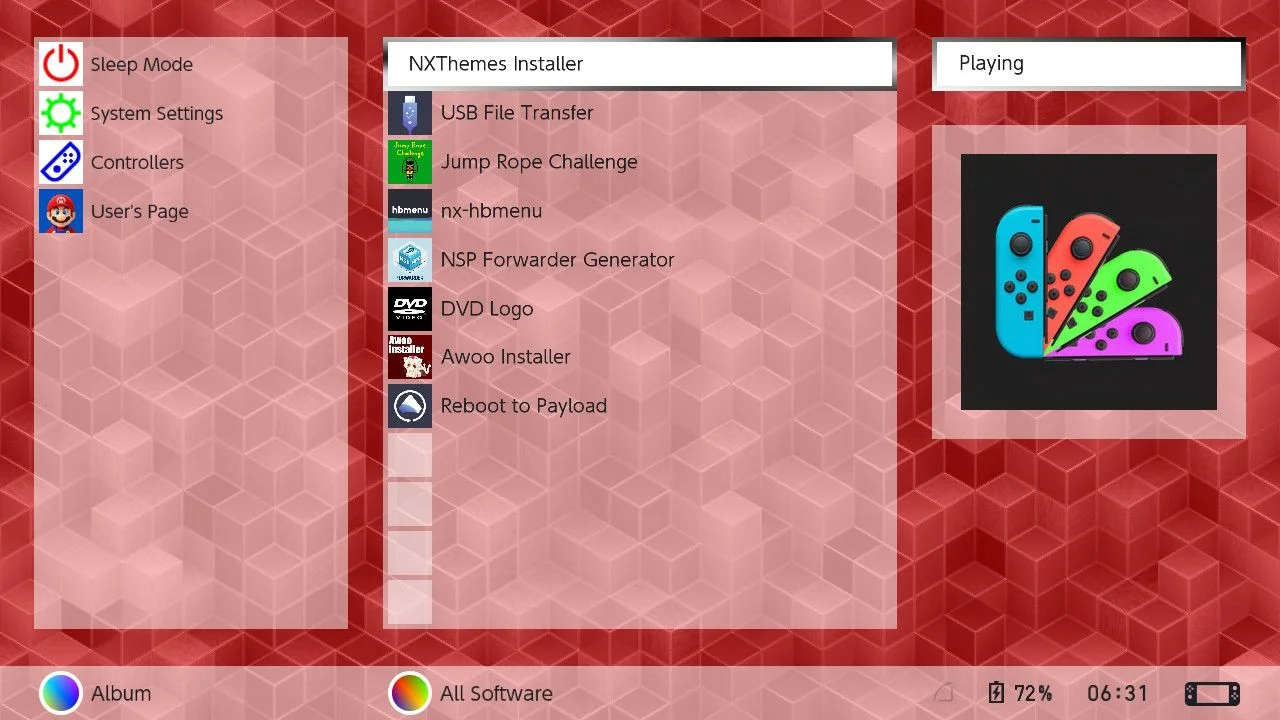
listOS - Defualt Home FW BELOW 22
TO START COLOR CHANGING BG MODE: Touch ‘all software’ once to select the button.
TO STOP COLOR CHANGING (CHOOSE YOUR OWN COLOR): Touch it while selected to open ‘all software’. Return home.
NOTE ‘all software’ DOES NOT REQUIRE 13 APPS to show and work!
You control the BG anim by touch, so do so before switching to tv.
FW VERSION 22.0.0 and above, you get spinning colored circle icons on the playing title! (tested on 22.1.0)
FW PRIOR to 22, no special circles for you, text indented to fill missing icon space (tested on 20.1.0)
This is listOS, a set of layouts styled like a file explorer with small vertical list style icons. Currently only the Home and Lock are done and uploaded. I spent months piecing together all the tricks in this over 200,000 char length home layout. It is more complex than most themes by an order of magnitude. Feel free to re-up this with your own bg or custom icons, it was designed to be used as a layout. Enjoy!
Home makes all icons apppear in a vertical list with left aligned text, and gives you a rotating game cube animation when playing :) This is banned layout (offline icons only). Works with any BG, tho it overlays a 50% alpha color wheel effect, so grayscale the bg if you want a solid color effect. Allows custom icons for power, settings, and controllers.
It fully uses usd colors, but only to invert the normal light dark values (USD 1 is text and 9 is background). I Did this to enable hiding hint text and footers of menus not in flaunch. It will work well with my seamless theme for the listOS menus I havnt uploaded yet, they also invert the normal color scheme.
Ready?

 TD576
TD576