
App Icon
  • Home
  • Create & Upload
  • Switch
  • 3DS/2DS
  • Wii U
  1. Switch
  2. Themes
Screenshots
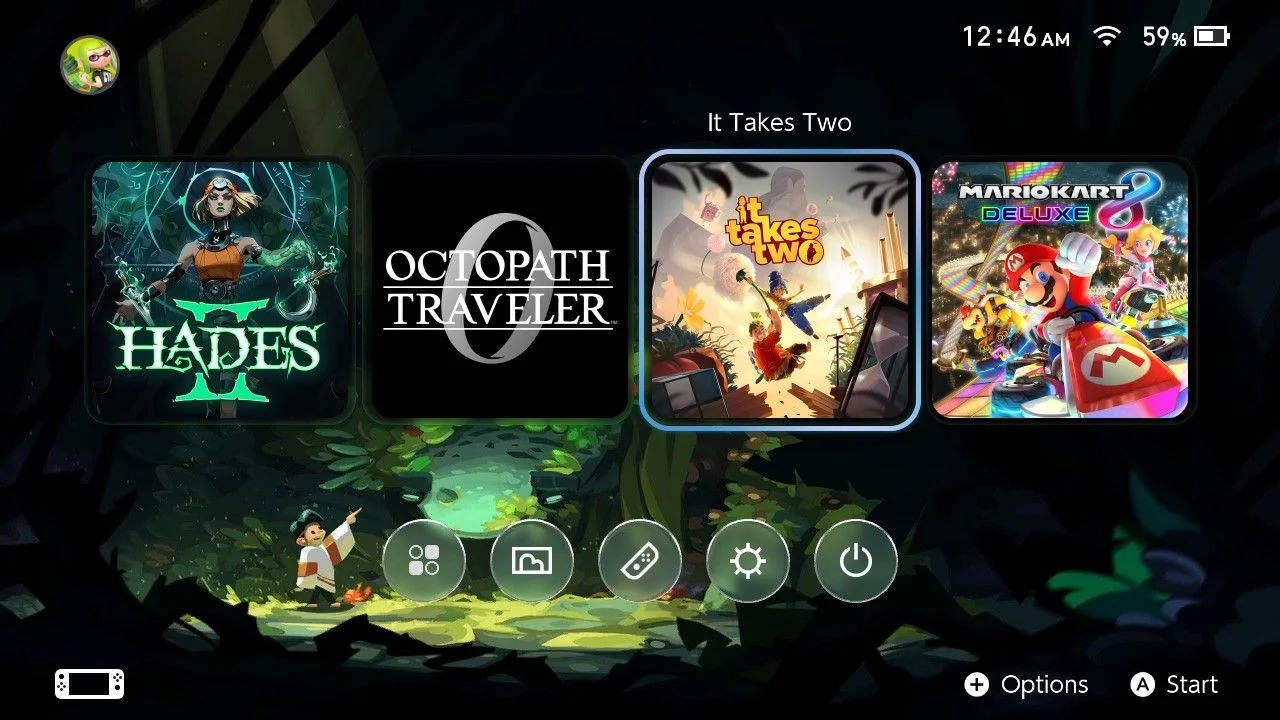
Magic Forest
Created 6/5/2026
0 saves0
519 downloads519
Home Menu
Dark Modehxhiep

After installation, head to Settings → Themes → Basic Dark. Limit the display to four game icons to keep the focus on the gaming experience rather than the screen. Move the All Software button to the bottom row and give it the Liquid Glass design.

Avatar
hxhiep
Download .nxtheme
NXThemes Installer App IconTAB4F
Part of Pack
Pack Preview
6
Happy OLED Forest
WARNING: This theme is not tested on firmware 21+. After installing, go to Settings → Themes → Basic Dark. I used JSON files from another theme and downloaded images from the internet to put this theme together, so none of the content is originally mine. It’s been tested on firmware versions 19.0.0 and 20.5.0, but I’m not sure how it works on other versions.
Comments
Sign in to comment
No comments yet. Be the first!
Similar Items
Screenshots
Pastel Sea
Avatar
hxhiep
0 saves0
604 downloads604
Screenshots
Magic Fox
Avatar
hxhiep
0 saves0
549 downloads549
Screenshots
Pinky Odyssey
Avatar
hxhiep
0 saves0
116 downloads116
Screenshots
Smash Icons (home, two rows)
Vini_Koopa
2 saves2
15778 downloads16K
Screenshots
Smash Icons (home, no eshop or news)
Vini_Koopa
0 saves0
14751 downloads15K
Screenshots
TOTK Pattern - Home
Nui
2 saves2
9001 downloads9K
DiscordAPIStatus
AboutContactGuidelinesTerms of ServicePrivacy PolicyCopyright / DMCA
© 2020-2026 ThemezerThemezer is an independent community project and is not affiliated with Nintendo.